 |
POP-UP HELP SCREEN |
|---|

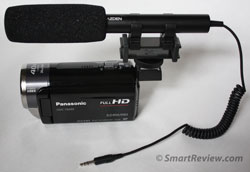 External
Microphone Jack - One of the most important features that is often overlooked when purchasing a camcorder is the addition of an external microphone jack. For consumer camcorders this consists of a standard 3.5mm jack where you can plug in
a variety of microphones that will give you much better audio quality than the built-in mic. Built-in microphones can pick up the noise of the camcorder itself and are designed to pick up sounds from all directions (omnidirectional).
While the built-in microphone may be adequate for some situations, there are others where the built-in microphone is lacking.
External
Microphone Jack - One of the most important features that is often overlooked when purchasing a camcorder is the addition of an external microphone jack. For consumer camcorders this consists of a standard 3.5mm jack where you can plug in
a variety of microphones that will give you much better audio quality than the built-in mic. Built-in microphones can pick up the noise of the camcorder itself and are designed to pick up sounds from all directions (omnidirectional).
While the built-in microphone may be adequate for some situations, there are others where the built-in microphone is lacking.
Windy conditions - The biggest problem with the built-in microphone will be in windy conditions. The wind can literally block all sounds other than the wind. There are a variety of external microphones that have foam sleeves to reduce the problems with wind (see picture above). For further reduction of wind, you can place a furry mit (called a 'dead cat') over the microphone which is the same as the professionals use.
Pinpointing a specific subject - If you are in a crowd and want to videotape a speaker or someone out of the crowd, the internal microphone will pick up all noises around you which would be distracting. A solution is to use what is called a directional microphone that will primarily pick up sounds in front of you, where you are pointing the microphone, instead of ambient noise around you.
Recording audio from a long distance - If you want to video your subject from a distance beyond the microphone's range, but still want to hear them, you can purchase a wireless microphone that can record audio from 100 feet away and more depending on the microphone.
There are many other options for audio, but these are only possible if your camcorder has a built-in microphone jack which we highly recommend. See our article on improving sound quality for more information.